

The Facebook Business Manager or, in English, Facebook Business Manager, is a platform that centralizes the management of fanpages and ads that e-commerce companies like yours create and carry out respectively on that social network and also on Instagram.
In fact, this platform brings together resources that make it possible not only to advertise with quality, but also to measure results. This makes it easier to find out where the errors are, optimize them and improve your sales.
If you want to know what these tools are, then keep reading. Discover five reasons to activate your online store, multi-store , marketplace, or other e-commerce website on Facebook Business Manager!
5 REASONS TO ACTIVATE FACEBOOK BUSINESS MANAGER
Facebook Business Manager is a hub that integrates tools that make it possible to create ads, manage promotion teams, manage online product catalogs and much more.
Once you've logged into Facebook Business , you'll have access to a home page containing information about your ad account performance, alerts, and general business activity on social media.
Its main tools can be accessed from the top left menu.
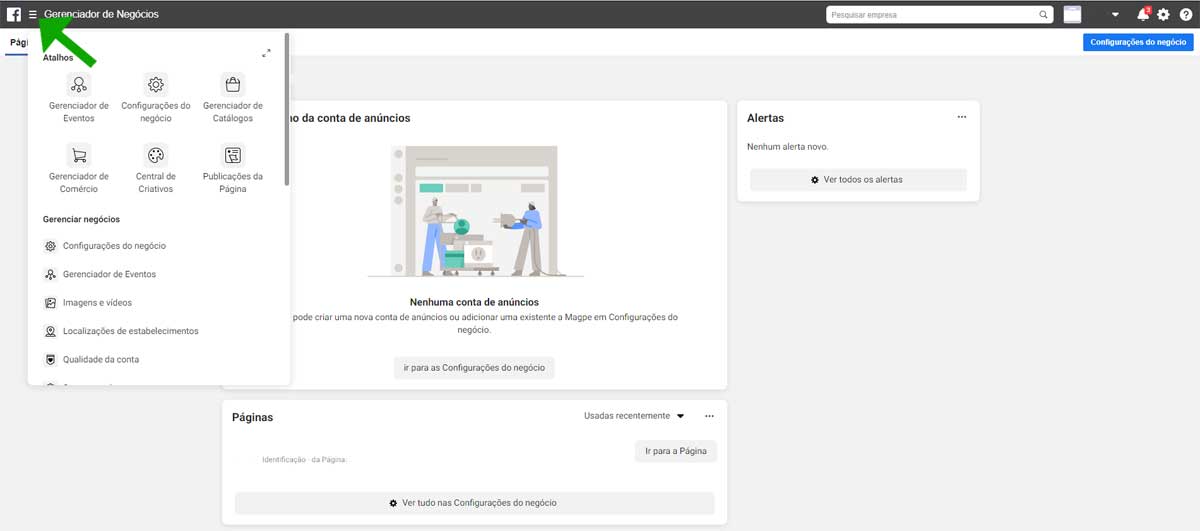
As you can see, the tools are separated into five distinct areas, which I consider the five fundamental reasons for you to join the platform as a whole, check out:
1 – Manage business:
In “Manage Business” you’ll find general tools to set up your business on Facebook and Instagram. Use them, for example, to add collaborators and partners to your ad projects or to integrate the Facebook Pixel.
The features in this wing also allow you to organize the images and videos from your ad accounts. Finally, include the location of your establishments so that you can work with regional ads. Check account quality, take care of brand safety and much more!
2 - Announce:
In “Advertise” you have access to the Creative Center, which is a type of online room where several collaborators can contribute to the creation of an ad. Contributors you authorize will be able to work on the ad from anywhere with internet access.
Here you also have access to the Ads Manager, which gives you control over your advertising campaigns. In addition, in this wing there is an automated rule creation system, which makes it possible to perform automatic optimizations and save your time.
3 - Analysis and reports:
Check out dozens of reports on funnels, retention, journeys, overlap and other metrics. Know the demographics of your customers and customers. Understand the impact of your Marketing on Facebook, Instagram and outside these social networks.
Run A/B tests, study control groups, do brand research, and more. Get ad and traffic analytics reports. Access Audience Insights charts and manage your brand's collaborators.
4 – Engage customers:
Create publications with photos, videos, texts or links. Choose between posting in ad and directly on a fanpage or just in ad. Track organic and paid traffic reach and engagement metrics on each post.
Schedule posts for publication at future dates. Publish in any formats you like. In other words, engage your customers with accurate posts until they become your customers and customers.
5 – Sell products and services
In this wing you will find resources to manage catalogs of products and services that you want to advertise on Facebook and Instagram. Use your inventories to advertise on Instagram Shopping, work with dynamic ads, Facebook store and collection ads.
Also get access to the Commerce Manager. This tool allows you to create and customize a virtual store within the social network. In this context, you can define one of three focuses: closing sales in your online store, closing on Facebook or Instagram, or via direct message.
Okay, now you have five reasons to create your Facebook Business account. In fact, that's exactly what you'll learn in the next topic. Keep reading!
HOW TO ACTIVATE FACEBOOK BUSINESS MANAGER
To activate the Facebook Business Manager, follow this simple step-by-step:
Get started by going to the link ;
Then, click on “Create Account”;
Then enter your company name, username and email and go ahead;
Finally, include your website and fill in your contact and location details.
Now that you are familiar with the general outlines of the platform and its tools, start activating its features gradually. Take your e-commerce brand to Facebook and Instagram and get more visitors, more leads, more customers and more customers!
As soon as you can, also click on " Facebook Marketing " and discover 10 tools to promote your online store on this social network.