

In English, Keyword Planner means "Keyword Planner." It's a free tool that indicates the number of times a keyword is searched on Google's search engine. It's essential for creating sponsored link campaigns . Additionally, it also assists in the production of organic SEO content.
In e-commerce, this tool is used so that an online store owner like you can know which terms Internet users use the most to search for their products on Google. Knowing this, it is possible to insert such terms in the titles, subtitles, descriptions, captions and other tags of your paid advertising campaigns and also in the organic ones.
In this way, by preparing your ads, content and sales pages with the most searched keywords, internet users will be able to find your e-commerce more easily and more often. That way, you can get more visits and sell more than your competitors.
Remember, though, that your competitors can also work with Keyword Planner. In this case, whoever has the most refined technique to find the best keywords and use them in the most appropriate way will be more successful.
HOW TO USE THE KEYWORD PLANNER
To use Keyword Planner, you first need to create an account on Google's advertising platform, Google Ads . Once logged in, simply click sequentially in the top menu on "Tools", "Planning" and "Keyword Planner".
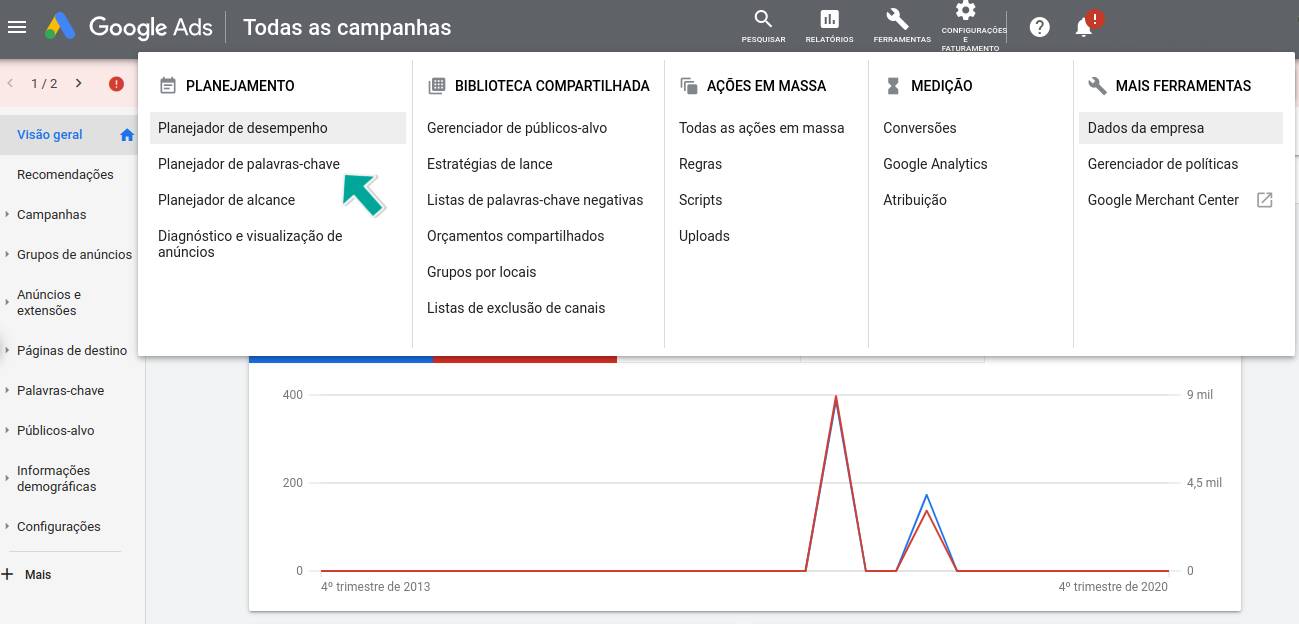
Ready! Then click on “Discover new keywords”. Then, enter the name of a product or service that is part of your e-commerce area of activity. Finally, press the “View results” button.
As an example, let's say you own an online gift shop and want to know more about how people search for these items on Google. Then enter the keyword “toast” in the appropriate field as I indicated in the previous paragraph.
Among the results you will find “personalized pens”, “personalized gifts” and “personalized keychain” at the top of the list with 10 to 100 monthly searches each. If you go down the list you will see that there are many other key terms, some more and some less searched. Choose the most promising ones and include them in your ads and also in your SEO content.
Finally, note that Keyword Planner has many features. You can get, for example, keyword ideas grouped together. You can also refine keywords by filtering brand, product, event, location, language, period, etc. Explore these features and get the most out of this tool.
ADVANTAGES
By using Keyword Planner you can, for example:
- Know the number of times the keywords are searched on Google;
- Stay on top of keyword ideas not yet explored by your e-commerce;
- Know about key terms you can use in your blog posts e-commerce blog;
- Know an estimate of how much you will pay to advertise with each keyword;
- Find out if a keyword has low, medium or high competition;
- Analyze your competitors' keywords.
Therefore, use Keyword Planner to study the most promising keywords for your business. Include such key terms on your online store sales pages and in your e-commerce blog posts. Also insert them into Google's paid ads and, in this way, attract more and more visitors and sell more and more!
As soon as you can, also click on “ Google Ads Coupon ” and find out how to get a R$100,00 promotional code to advertise your e-commerce!