

This is the third article in the monthly series about Google's sponsored links platform that I'm publishing here on the e-Plus e-commerce agency blog in 2020. This time, the topic is Google Ads Editor, an application that allows you to edit your ad campaigns offline.
First of all, to access the download page, download and install the app on your Windows PC, familiarize yourself with the interface, and start using it, click on “ Download Google Ads Editor ”. On the page that opens, find and press the download button. The download is free.
As you can see, on one hand we have the Google Ads platform , which allows you to manage online campaigns and ads; and on the other hand we have Google Ads Editor, an app that enables the management of the same thing, but offline. These two resources integrate and synchronize.
So, with Google Ads Editor, you can download one or more ad accounts from the Google Ads platform, which works online, and make changes offline. Afterwards, the changes are synced and published.
In this way, you can change your sponsored links campaigns for e-commerce while you are offline during a flight, for example, or in any other situation or time when for some reason it is not possible to access the internet. How great, right?
Get to know, in this article, the main functions of Google Ads Editor. Find out about the advantages of using this system. Access a short walkthrough that will help you to use the application for the first time.
Access and read the post " How Google Ads Works " to understand the importance of this advertising platform for your online store!
GOOGLE ADS EDITOR FEATURES
Google's offline ad editor makes it possible, for example:
- View, manage and edit multiple accounts at the same time;
- Make bulk changes to ad campaigns;
- Search and replace texts between campaign groups and ads;
- Copy and move items between campaign and ad groups;
- Change drafts before uploading to Google Ads online.

Very well, and to have access to these and other functions is very easy. Here's a short step-by-step guide to using this app for the first time.
STEP BY STEP TO USE THE APPLICATION
To use Google Ads Editor for the first time, follow these simple steps:
01 – First, access the download page I mentioned in the second paragraph;
02 – Download the app on a PC or laptop running Windows;
03 – Next, once inside the app, click on “Accounts”;
04 – Select “Add” to choose the accounts to be imported;
05 – Next, enter the email or customer ID of the account;
06 – Check the boxes next to the accounts selected for download and click OK;
07 – Next, select the campaigns that will be transferred to the app and click OK;
08 – Finally, select the account you want to manage and click “Open”.
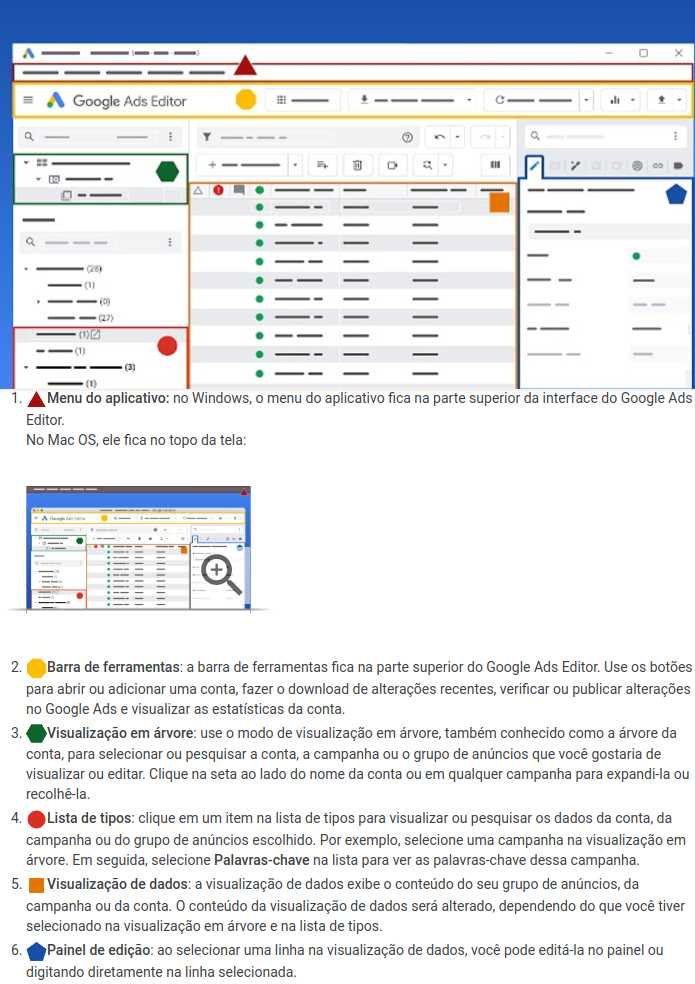
Now, check out the following infographic for an overview of the system interface:
Also access and read the post “ Google Ads or Adwords ”. Understand, then, the correct name for this sponsored links platform.
ADVANTAGES OF GOOGLE ADS EDITOR
As said, one of the best advantages of using Google Ads Editor is the fact that it works offline. Therefore, it is possible to manage your sponsored links campaigns for e-commerce from inside the plane or that congress without internet access, for example, or from other places, and then “up” everything online.
In addition, the app lets you manage multiple accounts using the same interface. That is, if you have multiple online stores or multiple stores, you will not need to login to each account. Instead, just select the account you want from a drop-down menu.
Another important point is that this offline editor allows you to modify campaigns without immediately integrating them into the main online system. This, in turn, allows a Digital Marketing manager to access the app to check the changes and approve or reject them before uploading.
Furthermore, this system allows you to find duplicate keywords more quickly. This facilitates the management of massive campaigns, that is, campaigns that have more than a thousand keywords. And it also makes it possible to add drafts, which offers more convenience for Digital Marketing teams.
Well, then, use Google Ads Editor and have more management power over your sponsored links campaigns for e-commerce. Make your day to day easier and carry out publicity campaigns with better and better performances!
Access and read our page “ Sponsored Links for E-commerce ”. Learn more about the paid advertising campaign creation and management service provided by the certified team at the e-Plus agency.