

Google Analytics 4, also known as GA4, is the current version of Google's famous analytics software. In operation since 2020, it replaces the Universal Analytics (UA) and Universal Analytics 360 (UA 360) versions, which will cease to function on July 1, 2023.
Designed primarily to support e-commerce analytics, GA4 offers greater precision in measuring web data. It comes with tools that make it easier to track the Customer Journey , among other new features. Learn more below!
NEWS IN GA4 AND DIFFERENCES COMPARED TO UNIVERSAL ANALYTICS
One of the main differences between the two versions of Google's analytics software is that Universal Analytics was based on pageviews . Therefore, every time a website page loaded, UA loaded as well, counting it as a view. Now, however, GA4 counts this process as an event.
In other words, in the UA version it was necessary to compute the category, action and label to arrive at the value of an event. In the GA4 version, the collection takes place directly at the event, which reduces the load on Google's servers, streamlines the process and improves the tool's usability.
Another notable difference is that the UA Bounce Rate resulted from the percentage of visitors who entered a site and left without interacting with other pages. Meanwhile, GA4 calculates this metric based on the percentage of sessions that the user interacted with on the first screen for more than 10 seconds.
The attribution model has also changed. In this context, one of the characteristics of Universal Analytics was that there was no possibility to modify the default attribution model, the “Last click (non-direct)”. GA4, in turn, works based on Data Driven Attribution, that is, on machine learning data.
Also, in the GA4 version of Google's analytics software we have:
Machine Learning
Equipped with Machine Learning , the GA4 system displays trends in consumer data collected from various sources. This allows you to generate more useful insights for your business, enabling you to make better decisions.
Optimized Measurements:
With GA4, it's possible to track metrics such as screen scrolls, page views, YouTube video engagement, clicks on external links, website searches, and file downloads , allowing you to better understand your business.
Integrated analytics:
Now web and app reports will be delivered on the same page. So it is possible to see the conversions of different channels in an integrated way. This allows for a better observation of the Consumer's Journey in the digital environment.
Analysis Hub:
Analysis Hub is a collection of advanced analytical techniques that allow you to discover deep insights into consumer behavior. Through it you can, for example, apply visualization styles, export data from other tools, etc.
Reorganization of reports:
The reports have been reorganized in GA4. The Lifecycle tab, for example, shows metrics based on the Sales Funnel . That is, it displays data on Acquisition, Engagement, Monetization, and Retention, which offers more practicality to the analyses.
Adapting to the future without Cookies:
According to a post by Canaltech , Universal Analytics performed web-based measurements for desktop using cookies . The GA4 version, however, operates across all platforms without relying on cookies , as it uses an event-based data model.
In addition, GA4 comes with privacy updates, customer-centric measurements rather than platform-centric, integrations like other software like Google Ads, and new metrics that let you predict things like “potential revenue”, ideal features for CRO in e-commerce. commerce.
HOW TO VIEW E-COMMERCE KPIS IN GA4?
Visualizing e-commerce KPIs in Google Analytics 4 is very simple. Take a look at some examples below:
Sales by brand:
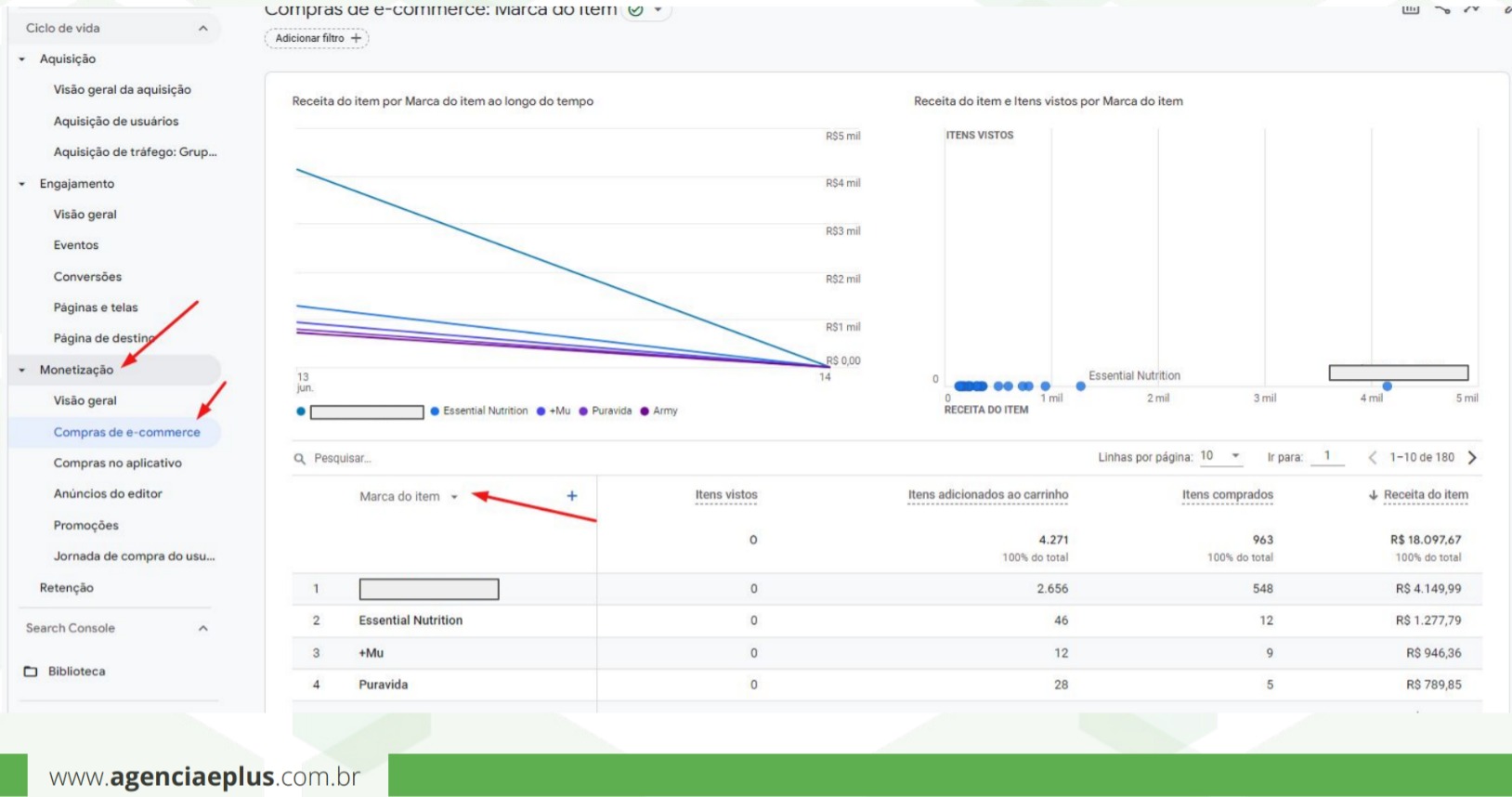
To access the “Sales by brand” KPI, first click on the “Monetization” menu. Ahead, select “E-Commerce Purchases”. Finally, view the data in the “item brand” column.
Cart add:
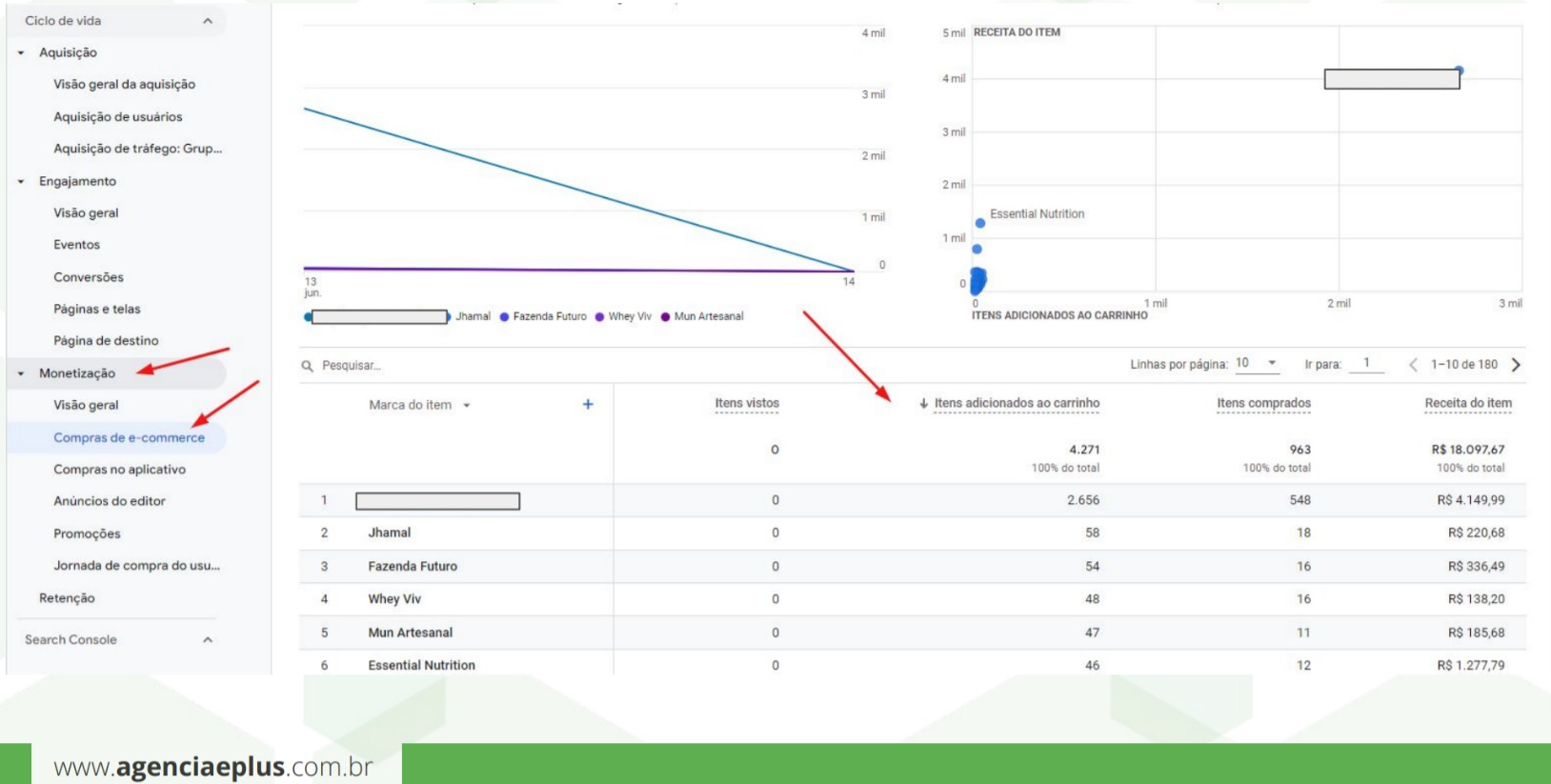
The “add to cart” KPI can also be seen in the same menu. So, click on “Monetization” and “E-commerce purchases”, and then see the data in the “Items added to cart” column.
Order Coupon:

Access to the KPI “Order Coupon” must occur from a click on the “Monetization” menu and another click on “Overview”. Later, observe the box “Purchase revenue by order coupon. And to see more data, click on the “View order coupons” link.
MEDIA REPORTS ORIGIN IN GA4
In the “Media Origin” reports, it is possible to visualize the origins of the traffic in your e-commerce. To access these reports in GA4 click, in sequence, on the left side menu on “Lifecycle”, “Acquisition” and “Traffic Acquisition”.
In the "Media Source" reports, you can view and analyze, for example, the channel group tables, remembering that the "Cross-network" channel refers to Google Performance Max (PMAX) campaigns. Additionally, you can also view "conversion paths" and "conversions by media" tables.
HOW TO MIGRATE YOUR VIRTUAL STORE AND E-COMMERCE BLOG TO GA4?
If you want to migrate your online store or your e-commerce blog to the new version of Google Analytics, start by going to the GA4 Setup Assistant. First, click on “Admin” in the lower left corner.
Then, in the “Account” column, choose the account you want to migrate. Then, in the “Property” column, select the Universal Analytics property that currently collects data on your site.
Then, still under “Property”, click on GA4 Configuration Wizard. Further on, under “I want to create a new Google Analytics 4 property”, press the “Start” button. Finally, click on “Create Property”.
By clicking on “Create Property”, the wizard creates your property in GA4, copies data such as the website URL and currency settings from Universal Analytics, and activates the optimized metric, among other actions.
If you need help migrating your online store or e-commerce blog to GA4, you can always contact the e-Plus Digital Marketing Agency . In fact, to get in touch with e-Plus Agency, simply click the button below and start a conversation via messaging app: