
VTEX Global Checkout is a setup that allows you to sell products to multiple countries, regardless of country of origin, from your VTEX virtual store. Thus, this feature allows you to activate the cross border in your e-commerce.
Specifically, cross-border e-commerce is the name given to transnational online commerce. It's the sale and export of products through your online store. In other words, it's the internationalization of your e-commerce operations.
VTEX Global Checkout, therefore, offers means for consumers from other countries to add invoice and delivery information for products sold on their e-commerce. Keep reading and learn more about it!
VTEX GLOBAL CHECKOUT SETTINGS
VTEX Global Checkout settings allow you to add typing options to checkout forms. For example, you can add fields for the consumer to type:
- Foreign document;
- International phone.
In addition, it is also possible to insert buttons such as:
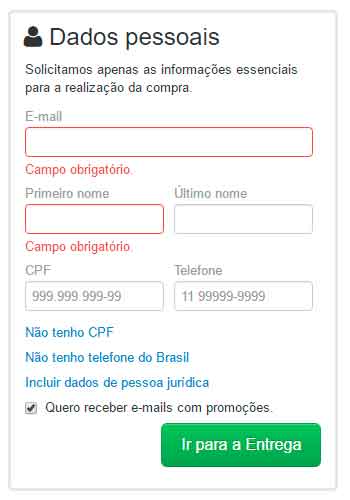
- I don't have a CPF;
- I don't have a Brazilian phone;
- Include legal entity data.
In addition, Global Checkout VTEX makes it possible to configure delivery and invoice addresses in other countries. For example, if you want your online store to be delivered to the US, just create a new carrier and add a new shipping spreadsheet for that country.
You can also configure billing addresses. Thus, when a consumer unchecks the option “My billing address is the same as the delivery address”, he will be able to enter a new address among the countries provided by his e-commerce. Finally, it is possible to allow the billing of a card whose billing address is in another country. To do this, however, you need to make a country selection field under “Invoice address” visible on your webshop page.
Be that as it may, remember, when using VTEX Global Checkout, you will need to display your online store in other languages. To do so, create a new commercial policy and assign it, in the Culture Info field, the desired language. Finally, adjust the front-end to finish the process.
As soon as you can, click on “ VTEX Suite ” and discover VTEX's main solutions for commerce!