

Sometimes in the silence of the night I know that you are there thinking about how to promote your virtual store more and better. Well, have you ever thought about creating a Google Ads campaign? With this platform it is possible to advertise in search results and on Google partner sites, that is, in very promising places.
I have to say, advertising on Google Ads is cheap compared to other media. In addition, campaigns can be measured. That way you can find out which ads are working and which are not. From there, just expand the good ads and optimize the not-so-good ones.
And look, I'll tell you, it's no big deal to use Google Ads. All it takes is a little patience to learn the basics and you're done. Well then, check out a step-by-step guide that will help you to use the system and start promoting your virtual store right now.
HOW TO CREATE A GOOGLE ADS CAMPAIGN
To create your Google Ads campaign, follow this simple step by step:
- First, create a Google Ads account and login;
- When entering the platform, click on “+New Campaign”;
- Soon after, select a goal (learn more about this later in this post);
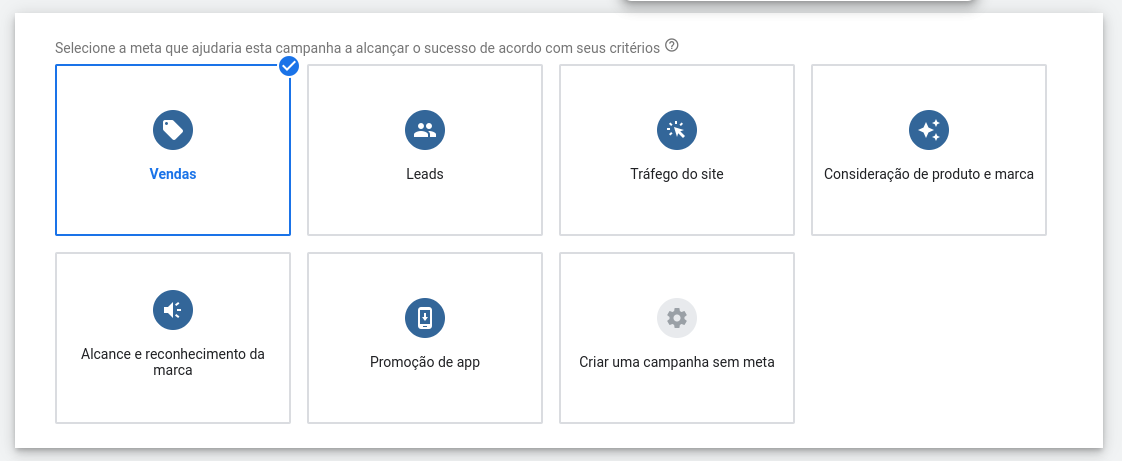
- Then choose what you want to achieve with your goal;
- Now, enter the location, phone or URL of your sales page and click “Continue”;
- Give your campaign a name;
- Choose location, language, audience, budget, bids and click “Save and Continue”;
- Afterwards, configure your ad groups and click “Save and Continue”;
- After that, create your ad. Include titles, description and URL and click “Save and Continue”;
- Finally, review and click “Publish”.
There you have it, as soon as your ad starts to appear in Google's search and partner sites, clicks and conversions will start to be counted. Check the data in the appropriate dashboards within the Google Ads platform.
OBJECTIVE OF THE GOOGLE ADS CAMPAIGN
Please note that when creating a Google Ads campaign, the system asks you to choose an objective. Among the targets available are:
- Sales: generate sales in the app, store or via phone;
- Leads: generate email subscribers;
- Traffic: generate qualified visitors to your e-commerce site;
- Consideration: helping people to get to know your products and services;
- Reach: promote your brand awareness among a large target audience;
- App: Drive installs and interactions with your app.
Also, see that there is also a campaign option without a goal. Then you create a campaign your way, without Google Ads recommendations for objectives. Anyway, after choosing the goal (or not), the platform will ask you to choose a type of campaign, which could be, for example:
- Research: generate text ads in Google search results;
- Display: generate display ads on partner sites, ie on the Google Display Network;
- Shopping: show information about your products on Google Shopping;
- Institutional: expose video ads on Youtube;
- App: advertise your app on multiple channels;
- Smart: automate your ad campaigns;
- Discovery: Advertise in online feeds.
As you can see, Google Ads allows you to work with a wide range of ads and different audiences. That way, you can advertise your product pages with more quality and make a lot more sales.
CONTROLLING YOUR CAMPAIGNS WITH PERFORMANCE MARKETING

Performance marketing is a practical science whose tools make it possible to promote, test, and optimize online ads. Generally, tests are conducted with small audiences, and when successful, they are expanded to larger audiences.
Some of the main performance marketing tools are Google Analytics, Google Optimize , Hotjar, and the Google Ads platform itself. With them, it's possible to monitor website traffic, conduct real-time usability tests, perform A/B tests, and much more.
Although it's possible to manage your Performance Marketing campaigns yourself, it's recommended to delegate this task to a performance agency , which has the tools and advanced technical knowledge on the subject. Well, it's up to you! =)
As soon as you can, also click on “ Google Ads Coupon ” and find out how to get a promotional code to advertise your e-commerce!